
CSS (Cascading Style Sheets) is a styling language used to control the appearance and layout of web pages. While HTML provides the structure of a webpage, CSS is responsible for making it visually attractive with colors, fonts, spacing, and layouts.
Every modern website uses CSS to create a better user experience and improve readability.
Why is CSS Important?#
Without CSS, web pages would appear as plain text with very little visual appeal. CSS helps developers create attractive and user-friendly websites.
Some benefits of CSS include:
- Adds colors and backgrounds
- Changes fonts and text styles
- Controls spacing and alignment
- Creates responsive layouts for different screen sizes
- Improves website appearance and usability
- Makes website maintenance easier
How CSS Works#
CSS works by selecting HTML elements and applying styles to them.
A CSS rule consists of:
- Selector
- Property
- Value
Example:
h1 {
  color: blue;
  font-size: 30px;
}
In this example:
h1is the selector.colorandfont-sizeare properties.blueand30pxare values.
The heading will appear blue and have a font size of 30 pixels.
Basic CSS Syntax#
The general syntax of CSS is:
selector {
  property: value;
}
Example:
p {
  color: green;
}
This changes the color of all paragraph text to green.
Ways to Add CSS#
There are three main ways to use CSS in a webpage.
Inline CSS#
Inline CSS is written directly inside an HTML element.
Example:
<h1 style="color: blue;">Welcome</h1>
This method is useful for small changes but is not recommended for large websites.
Internal CSS#
Internal CSS is written inside a <style> tag within the HTML document.
Example:
<head>
  <style>
    h1 {
      color: blue;
    }
  </style>
</head>
This method is suitable for single-page websites.
External CSS#
External CSS is stored in a separate .css file and linked to the HTML document.
HTML File:
<link rel="stylesheet" href="style.css">
CSS File:
h1 {
  color: blue;
}
This is the most commonly used method because it keeps HTML and CSS separate.
Common CSS Properties#
Text Color#
p {
  color: red;
}
Changes the color of text.
Background Color#
body {
  background-color: lightblue;
}
Changes the background color of the page.
Font Size#
h1 {
  font-size: 36px;
}
Changes the size of text.
Font Family#
p {
  font-family: Arial, sans-serif;
}
Changes the font style.
Text Alignment#
h1 {
  text-align: center;
}
Aligns text to the center.
Border#
div {
  border: 2px solid black;
}
Adds a border around an element.
Margin#
div {
  margin: 20px;
}
Adds space outside an element.
Padding#
div {
  padding: 15px;
}
Adds space inside an element.
CSS Selectors#
Selectors help target HTML elements for styling.
Element Selector#
p {
  color: blue;
}
Styles all paragraph elements.
Class Selector#
.highlight {
  color: red;
}
HTML:
<p class="highlight">Important text</p>
ID Selector#
#header {
  background-color: yellow;
}
HTML:
<div id="header">Website Header</div>
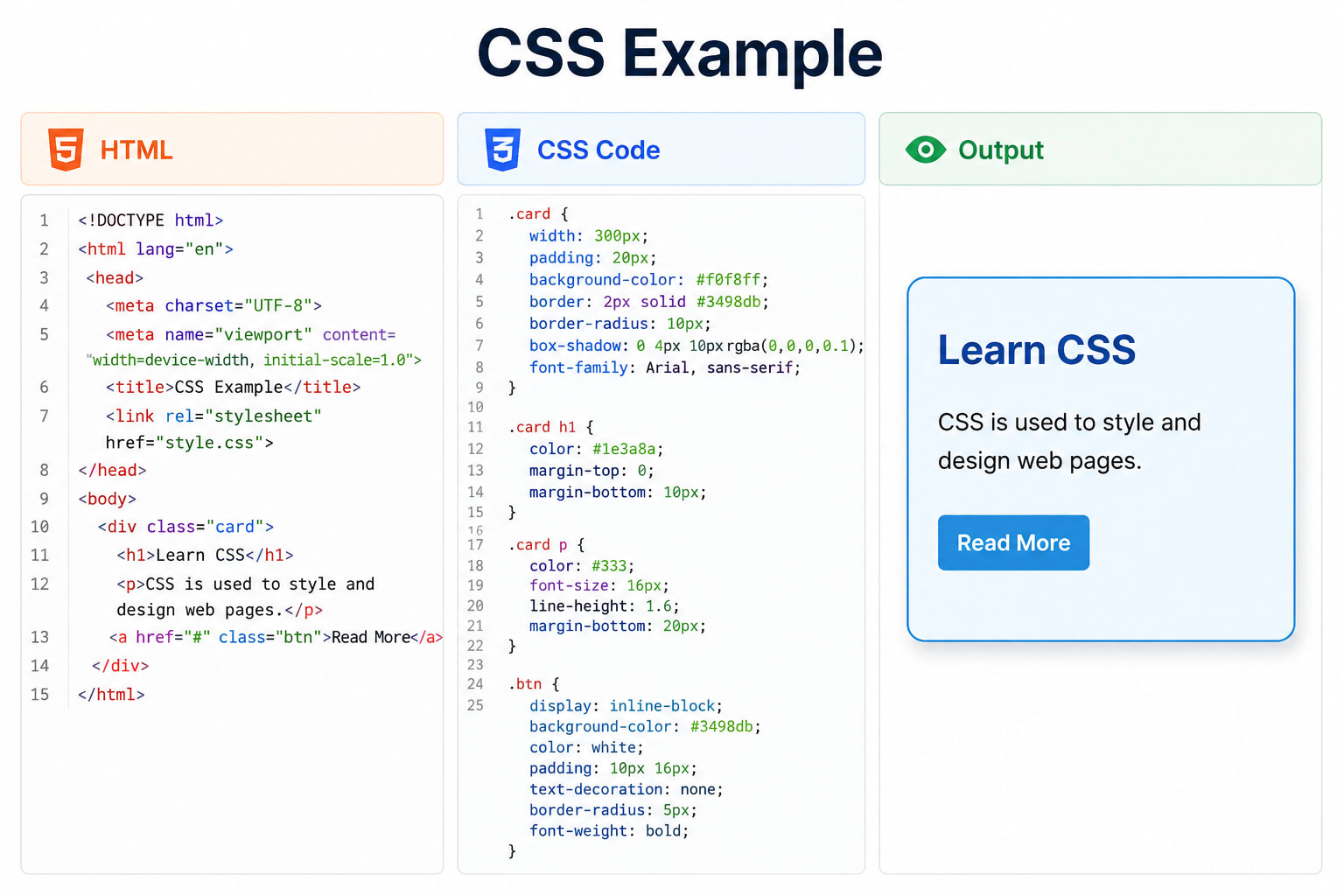
Simple CSS Example#
HTML:
<h1>My First Website</h1>
<p>Welcome to CSS learning.</p>
<button>Click Me</button>
CSS:
h1 {
  color: green;
  text-align: center;
}

p {
  font-size: 18px;
  color: darkblue;
}

button {
  background-color: blue;
  color: white;
  padding: 10px 20px;
}
The result will be a styled webpage with a green heading, blue paragraph text, and a blue button.
Advantages of CSS#
- Improves website appearance
- Reduces code repetition
- Makes websites responsive
- Speeds up website maintenance
- Enhances user experience
- Separates content from design
CSS and Responsive Design#
Modern websites need to work on desktops, tablets, and mobile phones.
CSS helps create responsive designs using media queries.
Example:
@media (max-width: 768px) {
  body {
    font-size: 14px;
  }
}
This changes the font size when viewed on smaller screens.
Best Practices for Learning CSS#
- Practice by creating simple web pages.
- Learn common CSS properties first.
- Use external CSS files whenever possible.
- Experiment with colors and layouts.
- Build small projects to improve your skills.
Conclusion#
CSS is an essential technology for web development that controls the appearance and layout of web pages. It works alongside HTML to create attractive, responsive, and user-friendly websites. By learning CSS fundamentals, beginners can start designing professional-looking web pages and prepare for advanced web development topics.

